
DIGITAL DEVICE CONTROL AND MONITORING

e-breathe e-Flow App

Intelligent control. Digital device testing. Connected safety.

With the e-breathe e-Flow app, your powered air-purifying respirator becomes an intelligently connected respiratory protection system. Monitor operating data, control your e-Flow, manage filter cartridges, and document additional device inspections—wirelessly, clearly, and without a user account.

Features at a glance

One app—countless possibilities.

The free app wirelessly connects your e-Flow powered air-purifying respirator to compatible smartphones, tablets, and alternative touchscreen devices, opening up numerous possibilities for device monitoring, control, maintenance, and documentation. Connection to compatible smartwatches is also supported. Select an area to explore the feature in detail.

Simple connection

Ready to go in three steps.

No user account, no complicated registration: The app detects nearby Bluetooth-enabled e-Flow devices and displays them with their signal strength.

A smartphone is not strictly required to use the e-Flow app. In addition to Android and iOS smartphones and tablets, cost-effective Android multimedia players or smartwatches with touchscreen and Bluetooth functionality can also be used.

Download app

Install the free e-breathe e-Flow app on a compatible Android or iOS device.

Select e-Flow

Select the device from the list. Flashing lights, vibration, and a four-digit code on the blower assist with identification and pairing.

Name device

Assign a custom name to conveniently manage and operate the connected e-Flow.

Also for older models: e-Flow devices without Bluetooth can be retrofitted by the e-breathe Safety Service Center. This involves replacing the mainboard and installing the latest firmware. You can check whether your device already supports Bluetooth by looking for the Bluetooth icon on the device display.

01 / Live Data & Control

Control Menu—full control over your e-Flow.

All essential operating information is clearly presented and continuously updated.

Conveniently control the blower via the app

In addition to device monitoring, the app enables direct operation of the connected e-Flow. Airflow volume and operating mode (hood, full mask, or half mask) can be easily adjusted via the app without needing direct access to the e-Flow—ideal when the blower is worn on the back or is difficult to reach beneath protective clothing.

Control the blower directly from your wrist: The Control Menu is also included in the smartwatch version.

02 / Filter Management

Filter Menu—intelligent management of filter cartridges

Schedule filter replacements, document operating hours, and track consumption.

The Filter Menu facilitates planning filter replacements and documenting actual service life. Filter types and customized replacement intervals can be recorded for particulate, gas, and combination filters.

Automatic filter history

When replacing a filter, the service life can be transferred to the filter history. This generates a traceable overview of used filters and their operating times—for improved filter replacement scheduling, consumption tracking, and operational cost analysis.

Important: Filter management serves as a supplementary documentation and planning tool. It does not replace the mandatory assessment of contaminant exposure or standard regulatory criteria for filter replacement.

03 / Digital Device Inspection

Check Menu—inspect and document digitally.

Independently inspect device functions, document findings, and ensure operational readiness.

The app guides users step-by-step through a structured functional test procedure for the e-Flow. Results can be documented, saved in an inspection history, and exported or sent as a PDF.

Inspection scope:

Additional functional tests can be defined individually according to usage profile and operational requirements. Regular checks assist in detecting malfunctions and damage at an early stage.

Note: The e-breathe Mass Flow Meter is required to perform the intended measurement tests.

Your advantage: Digital device testing streamlines the execution, documentation, and tracking of supplementary functional checks, supporting the operational management of respiratory protection equipment. Mandatory pre-use checks as well as required maintenance and statutory inspections remain unaffected.

04 / Device Data

Info Menu—all device data at a glance.

The Info Menu centralizes technical information about your e-Flow. The device name and device time can be adjusted as required—particularly useful when managing multiple units.

Also available on smartwatches: The Info Menu is part of the dedicated smartwatch version.

05 / Command Center

Multiple respirator wearers. One central overview.

All essential device data and alert notifications at a glance.

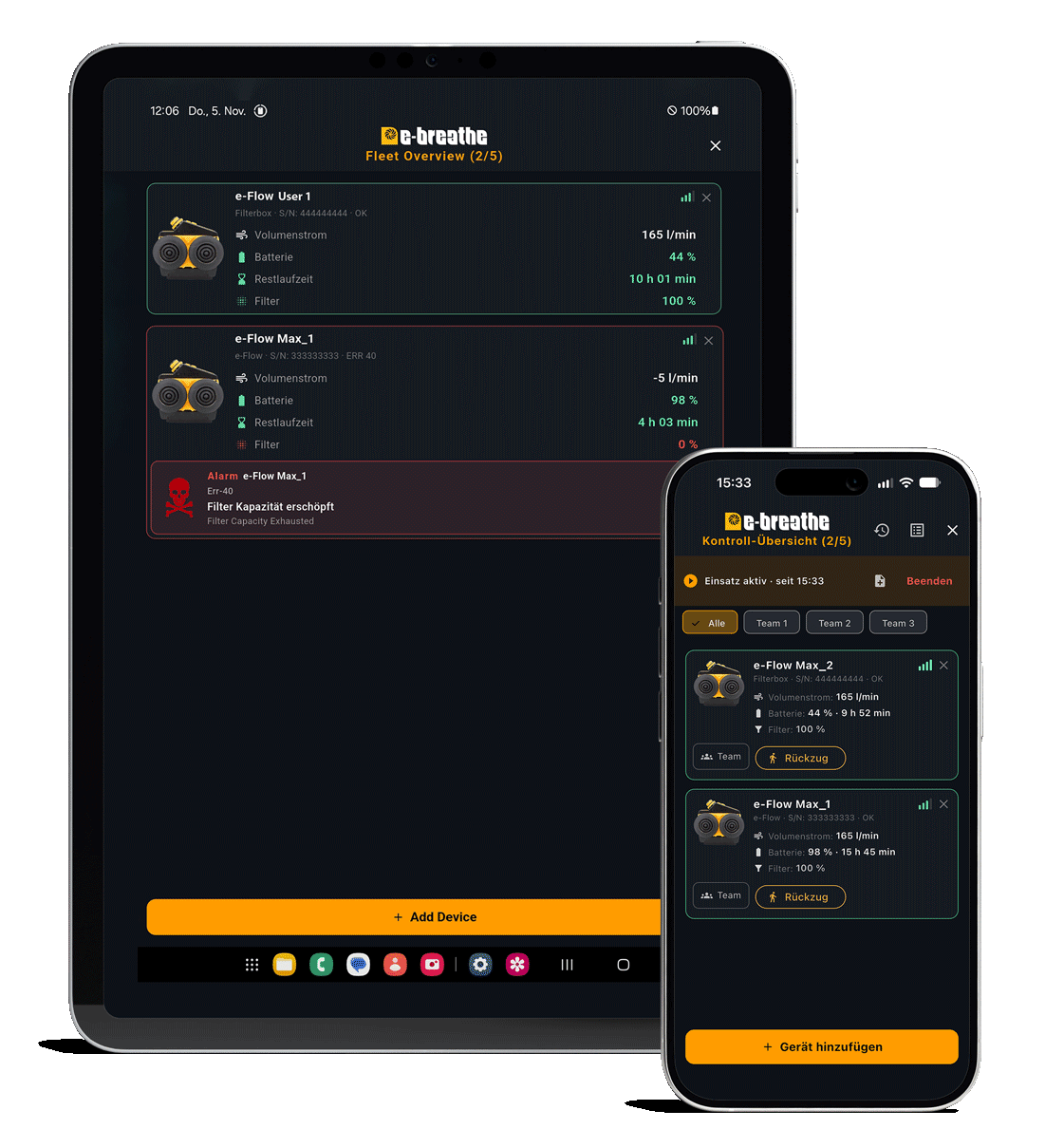
With the integrated Command Center, the e-breathe e-Flow app extends single-device monitoring: safety managers can monitor multiple connected e-Flow powered air-purifying respirators simultaneously and track their operating statuses from a central interface.

This simplifies oversight during operations involving multiple respirator wearers, helps identify warnings and connection issues faster, and supports targeted responses to critical situations.
Command Center Iphone Ipad Mockup

Command Center – Applications

Engineered for demanding multi-user operations

The Command Center serves as a supplementary monitoring solution wherever multiple personnel work simultaneously using powered air respiratory protection.

Important note: Central monitoring requires an active Bluetooth connection to the respective devices. These functions supplement existing safety and communication measures, but do not replace mandatory operational procedures or protective protocols.

Command Center – Centralized Device Monitoring

All e-Flow devices on one screen

Multiple e-Flow powered air-purifying respirators can be added to the Command Center and monitored collectively. Essential operating data is clearly displayed and continuously updated for every connected device.

Thanks to customizable device names, displayed values and alerts can be clearly assigned to the corresponding device or respirator wearer—even across larger teams.

Your advantage: A centralized overview of the technical status of all connected respiratory protection devices—without needing to access each device individually.

Command Center – Warning and Connection Status

Detect critical events early

In addition to operational data, the Command Center facilitates early detection and clear assignment of warnings, alarms, and connection drops.

ALARMS

Identify warnings centrally

When a warning or alarm occurs on a connected e-Flow, the notification is mirrored in the Command Center. Depending on the terminal device, acoustic signals or vibrations alert personnel to the event.

ASSIGNMENT

Identify affected device

The notification can be directly mapped to the specific e-Flow. This ensures the supervising personnel immediately know which device or respirator wearer is affected and can take targeted action.

CONNECTION

Monitor Bluetooth status

Wireless connection interruptions, whether caused by excessive distance or signal degradation, are clearly indicated on the monitoring screen.

Command Center – Supplementary Safety Communication

Communication between user and monitoring station

Using a dedicated HUD or control unit, additional signals can be exchanged between the respirator wearer and the supervising personnel, enabling more targeted communication in critical situations.

User → Command Center

Transmit emergency signal to central control

If a respirator wearer encounters a critical situation—such as sudden indisposition or an urgent need for assistance—they can trigger an emergency signal via the designated control unit. The signal appears in the Command Center and is mapped directly to the affected responder. The supervising person is thereby alerted to the situation and can initiate appropriate response measures.

Command Center → User

Transmit evacuation request

The monitoring station can also actively issue an evacuation request, for example if operational conditions deteriorate, a critical hazard emerges, or remaining runtime necessitates a return. The request is transmitted to the user via the designated HUD or display unit.

Strict separation between monitoring and device control
The Command Center is designed strictly as a monitoring and communication feature. The supervising person cannot modify the operating parameters of deployed e-Flow powered air-purifying respirators. Operation and control remain exclusively with the individual user, ensuring a clear division between central monitoring and individual device control.

06 / Mobile Operating Display · e-Flow App

e-Flow SmartView

All critical operating data directly on your arm.

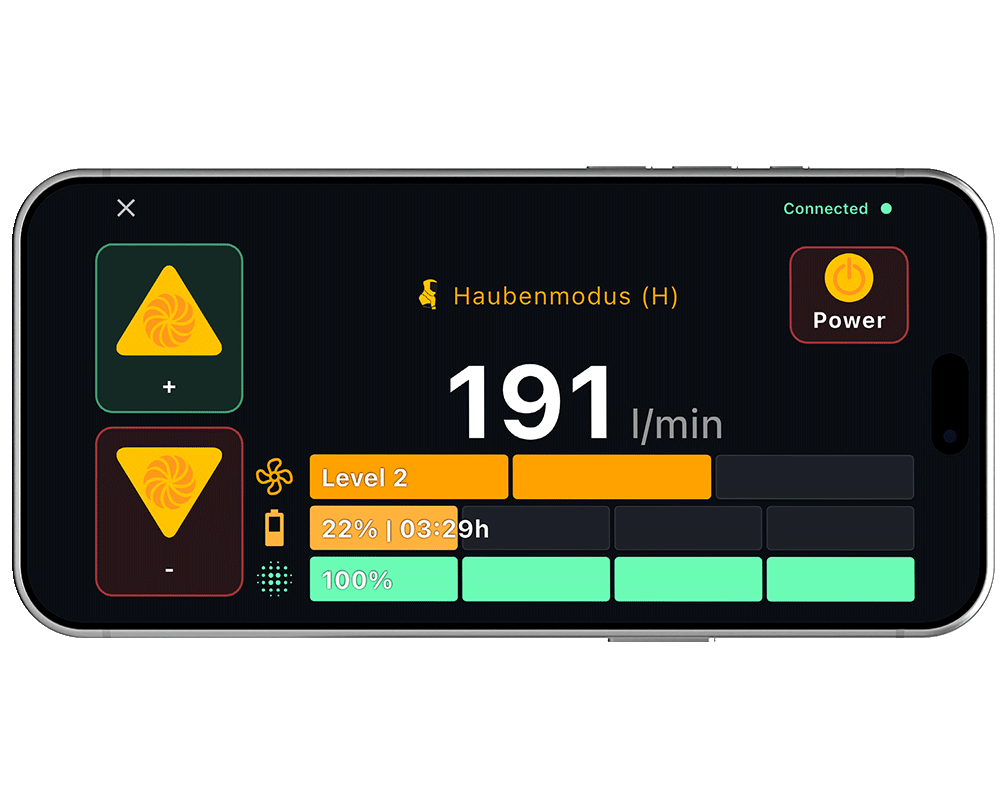
With the e-Flow SmartView feature, the e-breathe app displays essential operating data of the powered air-purifying respirator in a clear full-screen view on your smartphone, compatible touchscreen, or smartwatch. Device status remains accessible during use, even when the e-Flow itself is not directly visible or reachable while working.

Command Center Quer

Smartphone & Touchscreen

Full visibility. Even during operations.

On a compatible smartphone or touchscreen device, simply rotating the display 90 degrees prompts the app to switch automatically to the large-format SmartView layout. This allows key operating information to be checked directly from your arm.

Integrated controls allow the user to increase or decrease airflow volume and turn off the e-Flow without needing to operate the respirator unit itself. A matching mount allows the device to be securely fastened to the forearm.

Smartwatch

Key information directly on your wrist.

The specially adapted e-Flow smartwatch version provides a compact alternative. A compatible smartwatch connects to the e-Flow and displays key operating data directly on the wrist, eliminating the need for an additional smartphone forearm mount.

The smartwatch version includes the Control Menu, Info Menu, and e-Flow LiveCockpit. Extended functions such as filter management, digital device testing, and the Command Center are available on compatible smartphones or tablets.

PAPR Anzuf Mit Sichtfenster Für E Flow App

Use with protective suits

Usable inside a PAPR suit as well.

The SmartView feature is especially advantageous when working in PAPR suits. e-breathe PAPR-Suits can optionally be equipped with a transparent viewing window in the sleeve. A smartphone or smartwatch can thus be worn on the arm inside the protective suit, allowing critical operating data to be read through the window.

Thanks to its compact design, the smartwatch in particular offers a space-saving and comfortable solution for operating displays inside protective suits.

Kontakt

e-breathe Safety

Willicher Damm 99

D-41066 Mönchengladbach

Telefon: +49 (0) 2161 / 402900

info@e-breathe.de


Geschäftszeiten:

Mo. – Do. 09.00 – 16.30 Uhr

Fr. 09.00 – 14.30 Uhr